
Fabric and stabiliser
Tell NextStitch what you sew on: the fabric, its stretch and thickness, the stabiliser, and how Apply fabric settings adapts underlay and pull.
Updated October 31, 2026
The same design sews differently on a towel and on a T-shirt. A towel's pile swallows stitches that lie flat on cotton, and a jersey stretches under the needle where a woven fabric holds still. Tell NextStitch what you sew on, and it suggests the stabiliser and the needle — and, once you ask it to, it adapts the underlay and pull compensation to the fabric.
Choose the fabric
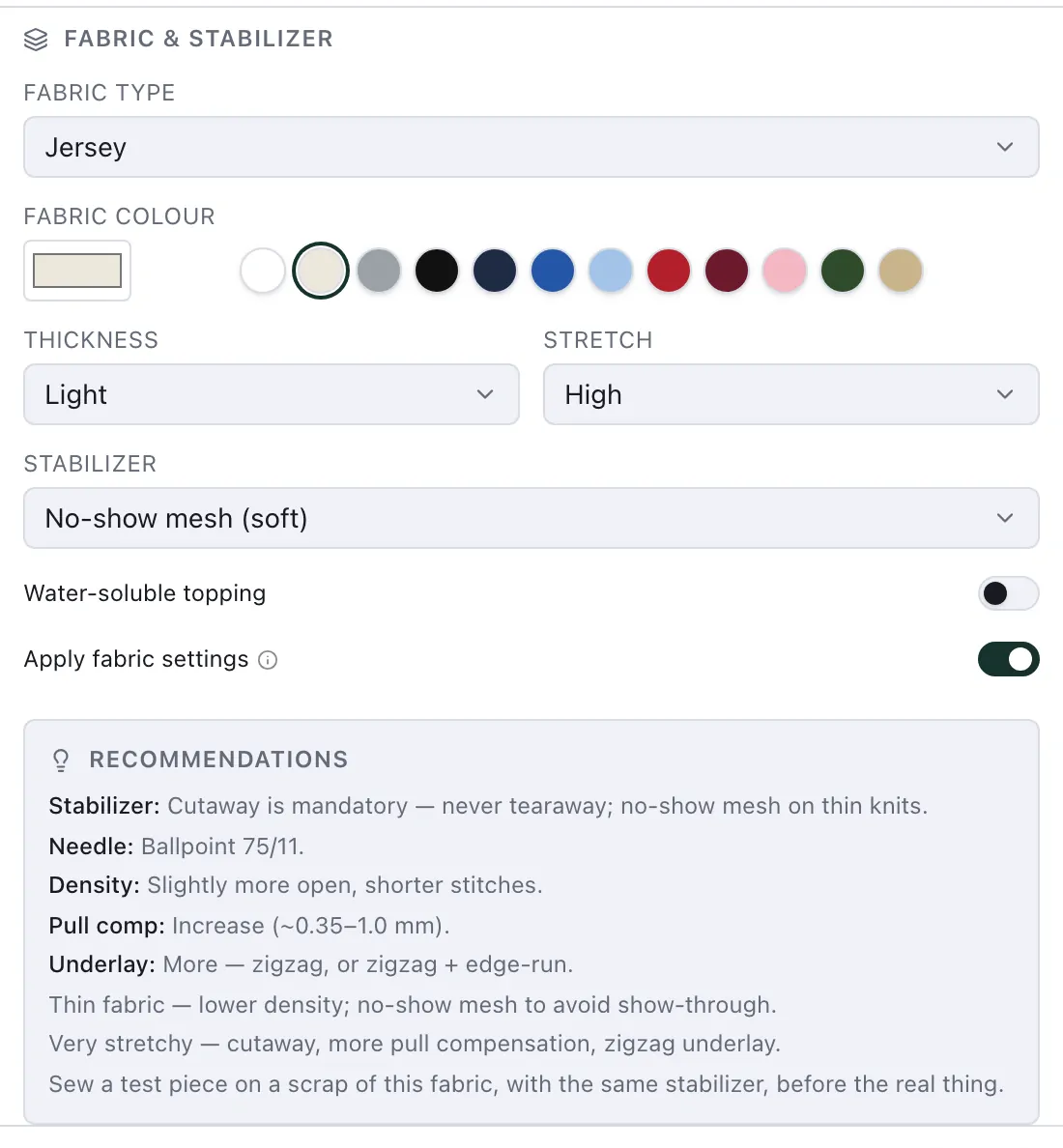
The fabric belongs to the design. Set it in File ▸ New for a new design, or in File ▸ Properties… for the one that is open, under Fabric & stabilizer:
Fabric type: the material, grouped by how it behaves under the needle (below).
Fabric colour: the colour the hoop is filled with on the canvas, in the Simulator and in the 3D view. Common garment colours are one click away.
Thickness and Stretch: each fabric brings its usual values; change them for the piece you have, a thin sweatshirt or a jersey that hardly stretches.
Stabilizer and Water-soluble topping: suggested from the fabric, and yours to change.
Every fabric belongs to one of six groups, and the group decides most of what follows:
| Group | For example | Stabiliser suggested |
|---|---|---|
| Woven (stable) | cotton, linen, denim, canvas, felt, softshell, quilted or padded | Tearaway |
| Knit / stretch | jersey, piqué, sweat, polyester jersey and mesh for sportswear | Cutaway, a soft no-show mesh on thin knits |
| Pile / napped | terry towelling, fleece, velvet, corduroy | Tearaway, with a topping |
| Sheer / delicate | silk, organza, batiste, tulle, free-standing lace | Wash-away |
| Leather / vinyl | leather, faux leather, vinyl, neoprene | Sticky tearaway, the piece floated on it |
| Cap / structured | cap fronts | as the cap's shell needs |
Your choice is remembered: the next new design starts on the same fabric.
Free-standing lace is the one fabric that is not a fabric: you sew it on a wash-away stabiliser alone, and once that is washed out the stitches are all there is. It has its own recommendations and a check of its own (Free-standing lace).
Stretch, thickness and the stabiliser
The stabiliser follows what you say about the fabric. Set Stretch to High on a cotton and the suggestion moves from tearaway to cutaway, because a fabric that stretches needs a stabiliser that stays behind the stitches; set Thickness to Light on a knit and it becomes the soft no-show mesh, which does not show through a thin fabric. The stabiliser changes only while it is still the suggestion: one you picked yourself stays as it is.
On a pile fabric the Water-soluble topping comes on: a film laid over the pile that keeps the stitches on top of it and washes out afterwards.
The recommendations
Below the fabric, Recommendations gives what the group needs: the stabiliser, the needle (a ballpoint for knits, a sharp for wovens, a wedge for leather), the density, pull compensation and underlay it wants, and notes for a thin, thick or stretchy fabric. They are advice: on their own they change no stitch. The last one is always the same: sew a test piece first.
Apply fabric settings
Switch on Apply fabric settings under the fabric, and the fabric changes how NextStitch chooses the underlay and pull compensation of every object set to Automatic (Underlay and pull compensation):
| Group | Underlay | Pull compensation |
|---|---|---|
| Woven (stable) | as without a fabric | as without a fabric |
| Knit / stretch | stronger | 1.75 × |
| Pile / napped | stronger | 1.25 × |
| Sheer / delicate | lighter under a satin: at most a Center walk; under a fill as without a fabric | 0.75 × |
| Leather / vinyl | none, as every needle hole stays | 1.25 × |
| Cap / structured | stronger | 2 × |
A stronger underlay puts an Edge walk and a Zigzag under every satin from 1.5 mm wide, where a woven fabric gets the zigzag only from 4 mm, and a second layer of rows under a fill large enough for an underlay, along its own rows. Stretch adds to the pull compensation, 15 % for Low and 30 % for High, and High makes a woven fabric's underlay stronger too; a knit, a pile fabric and a cap have the stronger one already, and a sheer fabric and leather keep theirs. A Heavy fabric adds 10 % to the pull compensation, a Light one nothing. The numbers multiply: a jersey that stretches a lot (High) gets 1.75 × 1.3, about 2.3 times the pull compensation. Pull compensation never goes past 1 mm on a side.
The figure shows the same satin line and fill, both on Automatic, on a woven cotton and on a jersey, the fabric applied.
What it leaves alone:
values you set by hand: an object with Custom or None underlay, or its own pull compensation, keeps them;
density, spacing, stitch length, the outline's stitch and everything else.
Apply fabric settings is off until you switch it on, so a design you made before keeps its stitches when you open it. It is not offered for Free-standing lace: a lace keeps Automatic as it is, because a sheer's lighter underlay would weaken the lattice that holds it together. File ▸ New offers it again whenever you pick a fabric, starting as your last design had it. Switch it off to sew the design as without a fabric again.
New objects only, or all objects
When you apply the fabric to a design that already has objects on Automatic, or change the fabric of a design that applies it, NextStitch asks once which objects it is for:
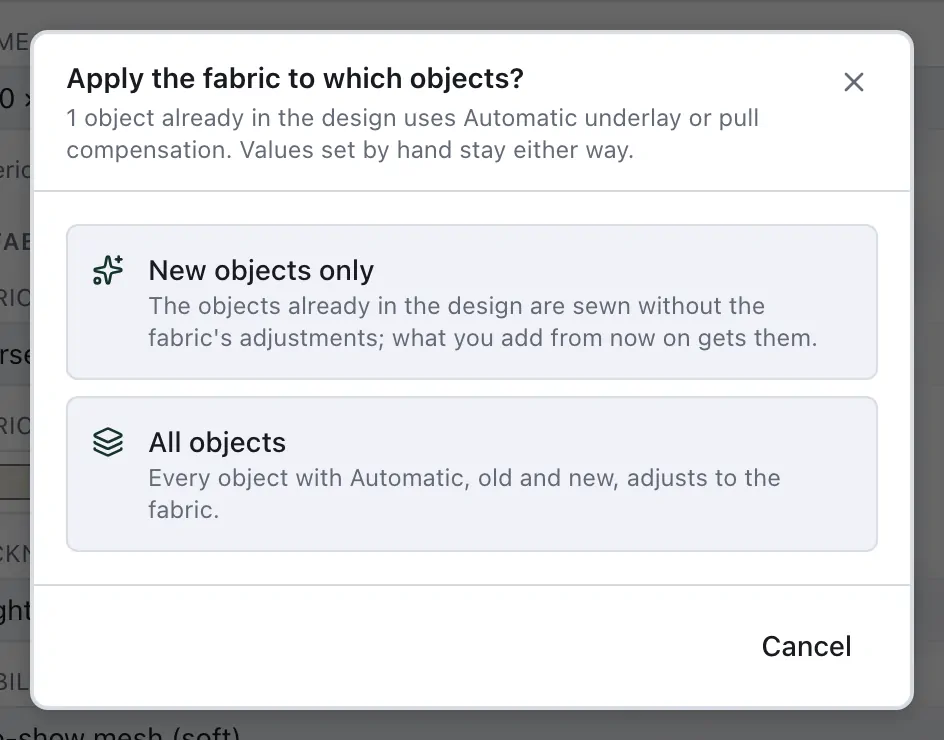
New objects only: the objects already in the design are sewn without the fabric's adjustments, and what you add from now on gets them. Use it for a finished design you only want to add to.
All objects: every object on Automatic, old and new, follows the fabric.
Either way, the fabric and your answer are one step to undo. The answer holds while Properties stays open, so changing the stretch after the fabric type asks nothing more. A copy or a duplicate of an object is a new object, and takes the fabric like any other.
The fabric checks
Problems compares the fabric with how its objects are sewn (Scrub the stitch preview):
No underlay on a pile fabric: a fill or satin sewn with no underlay on towelling, fleece or velvet sinks into the pile. Give it an underlay, or lay a towel under-layer under it with Object ▸ Add towel under-layer.
No underlay on a stretch fabric: a fill or satin whose underlay you switched off may pucker and leave gaps on a knit.
Fill rows along a long, narrow shape: rows that run the length of a long, narrow fill add their pull up along it, so the shape can come out shorter and gather the fabric. Turn 90° on the note turns the rows across in one step.
Lace parts that do not connect: on Free-standing lace, a part whose stitches touch nothing else, which would fall out once the stabiliser is washed away (Free-standing lace).
The first two have Fabric settings, which opens File ▸ Properties at the fabric. Each can be switched off under View ▸ Warnings.
Sew a test piece first
No setting replaces a try-out. Before the real garment, sew the design on a scrap of the same fabric, with the same stabiliser, hooped the same way: you see at once whether the underlay holds, the outlines meet and the colours work. The Export dialog and Stitch now remind you, and it is worth it every time you change the design, the fabric or the thread.