
Sewing time and bobbin
Read sewing-time and thread estimates, then adjust them for your machine.
Updated November 17, 2026
The status bar shows the sewing time; the export dialog and the print view add the bobbin thread the design will use. The export dialog's time is the file's: it counts what the file adds — registration marks, a travel from the start and back — which the status bar leaves out. Both are estimates at your machine’s speed — set it under File ▸ Design settings ▸ Production ▸ Advanced ▸ Machine speed (stitches/min) — with pauses for trims, colour changes and stops as long as your machine takes (below). A design saved to your account keeps its sewing time, and My files shows it in its Details view (Projects and files).
Design info and the print view give the top thread too: the length the needle sews — jumps and the moves after a trim are left out — plus an allowance for the thread taken into the fabric: 5 % for a light fabric, 8 % for a medium-weight one (and when the design names no fabric), 12 % for a heavy one, by the fabric in File ▸ Design settings. These are rules of thumb: keep some thread in reserve.
Your machine's times
How long a trim, a colour change and a stop take is your machine's: in My machines, its Defaults tab takes Time per trim, Time per colour change and Time per stop. Until you set them, a trim counts 5 s, a stop 30 s, and a colour change 30 s — the time to rethread a single-needle machine — or 5 s on a multi-needle machine, which changes needles by itself. A design made for one of your machines reckons with its times as they are now, wherever a sewing time is shown; one made for a machine from the catalogue, or for none, with the typical ones.
Design info
Design info, at the foot of the right rail's Stitch group and folded until you open it, gives the figures of the design as the machine will sew it: its size, stitches, colour blocks and thread changes, threads, trims, jumps and stops, the top and bobbin thread, the sewing time, and each thread's share.
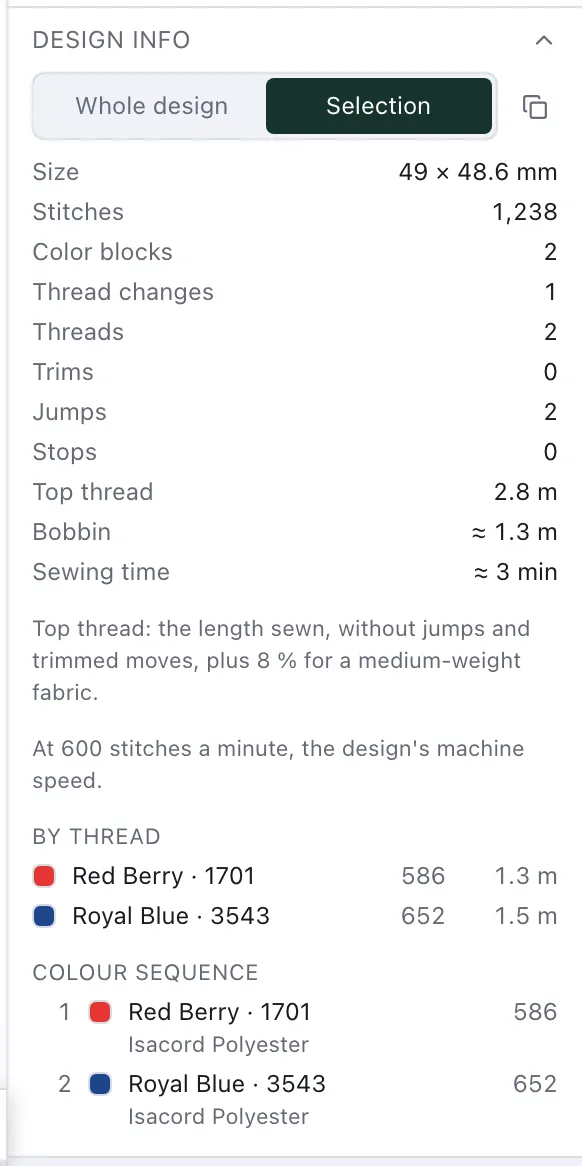
Copy, the button beside Whole design and Selection, puts these figures on the clipboard as text, one to a line — Size: 85 × 60.2 mm, Stitches: 12,345 — in the editor's language and units, for the whole design or the selection, whichever is shown, and with Cost per piece while it shows. Paste them into a quote or an e-mail. For a moment the button shows a tick.
A selection's figures
Choose Selection at the top of Design info, and the figures are those of the selected objects alone: what they sew where they stand in the design, their ties and trims included, so the selection's stitches and time add up with the rest to the whole design's. Two objects in one thread with another colour sewn between them count as one colour block, as they would on their own. Whole design goes back to the whole. With nothing selected, Design info asks you to select something.
Cost per piece
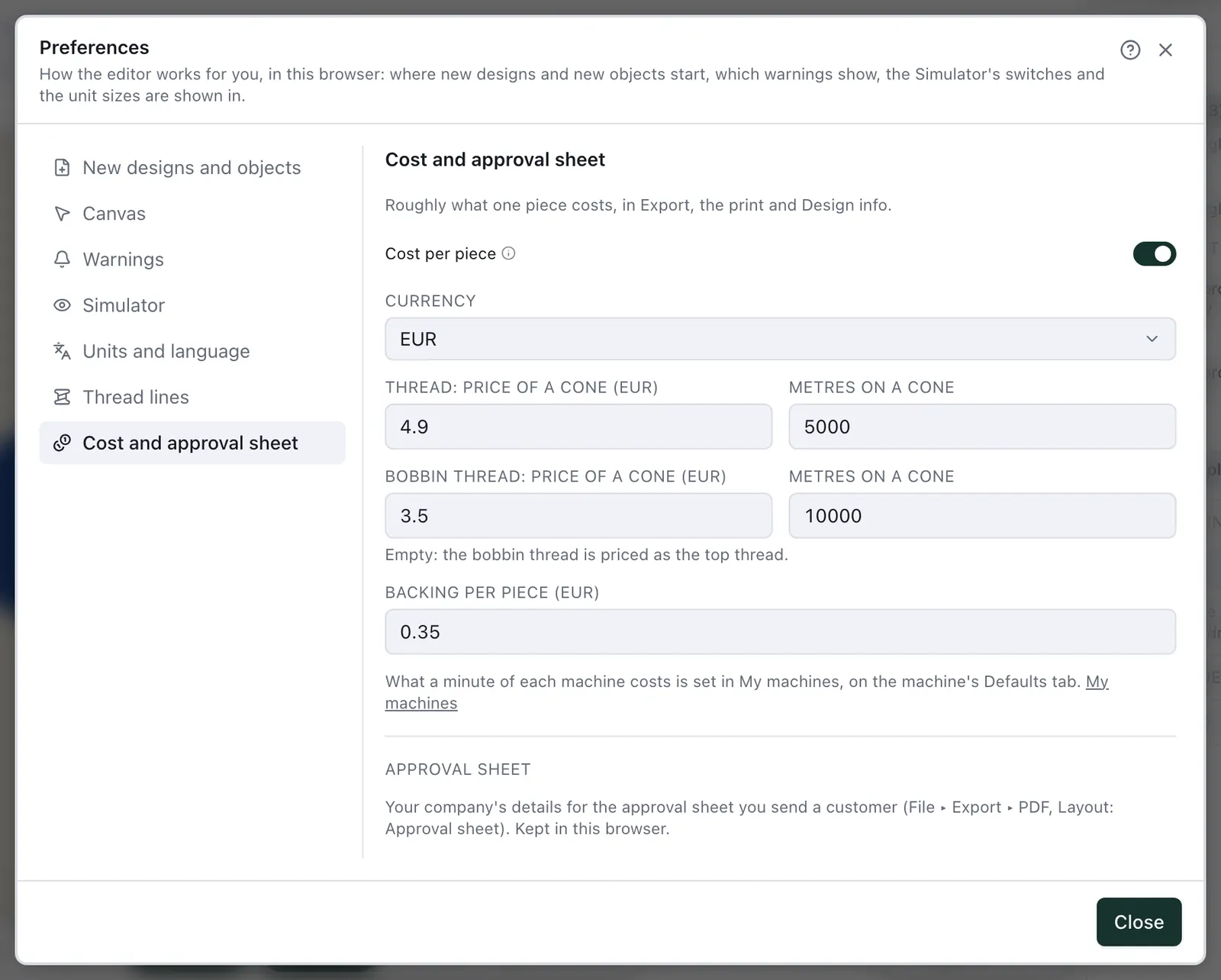
To quote a job, switch on Cost per piece in Settings ▸ Preferences ▸ Cost and approval sheet. It is off until you do, and while it is off no cost shows anywhere. On, set the Currency, what a cone of top thread costs and how many metres it holds (5,000 if you leave it empty), the same for a cone of Bobbin thread — left empty, the bobbin thread is priced as the top thread — and the Backing per piece. What a minute of the machine costs is set for each machine in My machines, on its Defaults tab, under Cost per minute: the field shows only while cost is on in that browser. The rates are kept in this browser.
Design info, the export dialog and the worksheet then show Cost per piece: the top thread with its allowance at the cone's price, the bobbin thread the design takes, the backing, and the sewing time at the machine's rate, each part named. A design made for no machine of yours is priced without machine time, and says so. Rates beside the figure opens the rates. In Design info it follows the scope, so Selection prices the selected objects. It is an estimate for a quote, from the same sewing time and thread as the figures above.
The colour sequence
Colour sequence lists the colour blocks in the order the machine sews them, each with its thread's name, number and brand and the stitches it sews: the list to lay the threads out by, or to set up a machine with several needles. A thread sewn twice is listed twice; By thread above it adds each thread's blocks together. For a design made for a multi-needle machine, each block shows its needle — "N3" — in the warning colour where that needle is rethreaded (A multi-needle machine).