
Cross stitch
Cell size and fabric count, threads, cross types and partial stitches, one grid for the design, crosses on a line, lettering and resizing in cross stitch.
Updated November 1, 2026
Cross stitch lays a grid of square cells over a shape and sews a small cross in every cell the shape covers, as counted cross stitch is worked by hand on Aida. Choose Cross stitch under Type in the bar above the canvas, in the Stitch view, and set it in Stitch settings in the right rail.
Each figure here is the stitch engine's own plan for the shape shown: every line is a stitch, sewn where NextStitch would sew it, and the numbers under a figure are counted from those stitches.
On an area or along a line
On a closed shape, cross stitch fills the area: every cell the shape covers well enough gets a cross. On an open line — a pen line, a polyline — it sews a row of crosses along the line: a chain of cells one cross wide, each cross meeting the next at a corner, as a cross-stitch chart draws a line. The type is offered for both; on a line, the settings that are about an area's edge, Partial stitches at the edge and Coverage (%), are left out.
Cross types
Cross type chooses the figure sewn in each cell, and the bar's Cross does the same:
Cross (×) — the classic cross, two diagonals.
Upright (+) and Dense upright — a plus, a cross turned a quarter.
Double cross and Smyrna cross — a cross and a plus on top of each other, heavier and raised.
Half cross (/) — one diagonal per cell, half the thread of a full cross, for a lighter area or a shaded background.
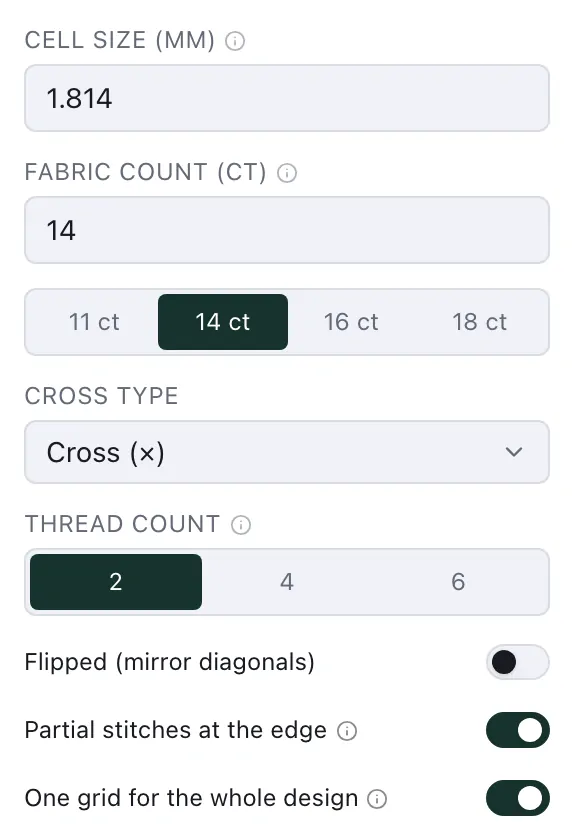
Flipped (mirror diagonals) sews the diagonals the other way round; for a half cross it chooses the other diagonal, \ instead of /.
Cell size and fabric count
Cell size (mm) is the side of one cell, so the size of each cross. Beside it, Fabric count (ct) gives the same size as Aida is sold: cells to the inch. Type either one: 14 ct is 25.4 mm divided by 14, a cell of 1.81 mm, and a cell you type in millimetres shows as its count. The buttons under them set the common counts, 11 ct, 14 ct, 16 ct and 18 ct. The count is not stored on its own: it is another way to type the cell. The bar has both too, Cell and ct.
A shape you make cross stitch starts at 14 ct. A higher count gives smaller crosses and more of them, so finer detail and more stitches.
14 ct294 stitches · 0.52 m sewn
Thread count
Thread count — 2, 4 or 6, beside the cross type, and Threads in the bar — is how many threads lie in each arm of a cross: each arm is sewn the count divided by two times, on the same needle points. 2 is one pass, the usual; 4 and 6 give a bolder cross. A count read from a file that these do not name shows as what it sews.
Partial stitches
Where a shape's edge cuts through a cell, Partial stitches at the edge sews only the part of the cell inside the shape — a quarter, a half or three quarters of a cross — so no arm reaches into the empty area beside it. A new cross-stitch area has it on. Off, a cell is sewn whole when enough of it lies inside the shape (Coverage (%), under Advanced) and left out otherwise, as cross stitch is charted by hand.
One grid for the design
With One grid for the whole design on — a new cross-stitch area has it — every cross-stitch area of the design lies on the same grid, so neighbouring areas line up cell for cell and two colours that meet share the cells along their edge. Off, an area lays its grid from its own corner.
The design remembers where its grid lies once its first cross stitch on it is made, traced or pasted, so moving, adding or deleting one area no longer moves the crosses of the others. Areas of different cell sizes each have their own grid, through the same point.
The cross grid on screen
In the Stitch view, cross stitch is drawn with its crosses in the cells they are sewn in, and the grid is drawn over it: the cells' lines, and a bold line every ten crosses, as a printed chart counts them. With cross-stitch objects selected the grid is drawn over them alone, otherwise over all of them. View ▸ Cross grid hides it.
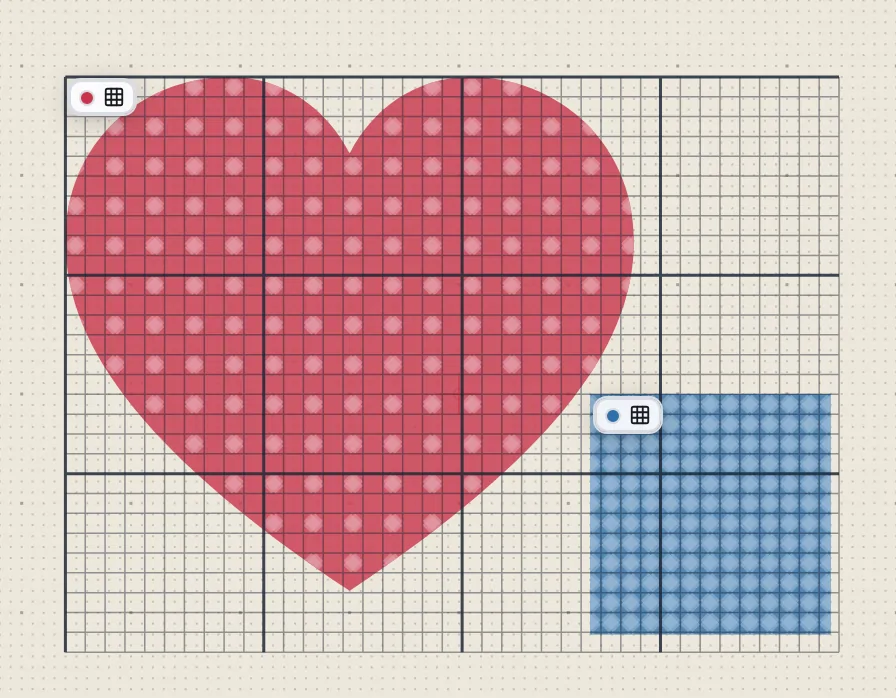
View ▸ Grid settings ▸ Match the cross grid sets the canvas grid to one cell and ten, laid on the cross-stitch grid, so the canvas's lines and its snapping are the cells' — for this design only; the next new design starts with your own grid. Typing a spacing there lays the grid out from the hoop's centre again.
Moving, copying and turning
A selection of cross stitch alone moves by whole cells, so it keeps its crosses: dragged, it moves cell by cell; an arrow key moves it one cell, with Shift as many cells as come nearest the longer step; X and Y round to whole cells. A paste, Duplicate, a copy dragged with Alt and Object ▸ Step and repeat… place the copies whole cells away too. Turned, cross stitch stays upright on its grid: the turned shape is filled with crosses afresh, and the notice line says so.
Resizing
Making a cross-stitch design larger or smaller keeps its pattern: the cells grow or shrink with it, so it has the same crosses, larger or smaller. That is so for W and H, the handles, Fit in Problems for a design larger than its hoop, a catalogue design fitted to the hoop and the width of a quick download. To keep the crosses' size instead, so a larger design gets more of them, press Keep the cross size when resizing beside W and H; it stays as you set it in this browser.
Crosses under about 1.4 mm fill in: Problems warns about them, with their size and fabric count. A traced design keeps the fabric count you traced it at when it is placed in the hoop.
Lettering in cross stitch
In Insert ▸ Lettering…, choose Cross stitch under Stitch type for a TrueType or OpenType font: its letters are filled with crosses on the design's grid. When the design's current text settings are cross stitch, the dialog opens on Cross stitch in Poppins Bold, a heavy sans whose letters keep their shape on the cells, and the text takes their cell; otherwise a cross-stitch text starts on 14 ct. A cross-stitch letter needs about seven crosses of height to read, whatever the font, so Problems warns when the capitals are fewer crosses tall than that: make the text larger, or the crosses smaller with a higher fabric count. The lettering font Abécédaire AGS is drawn in cross stitch by itself.
Crosses on a line
Give an open line the type Cross stitch and it is sewn as a row of crosses: a chain of cells along the line, one cross wide, each cross meeting the next at a corner, sewn one after another from the line's start. A straight line becomes a staircase of crosses, a curve follows its cells. Draw it with the pen or the polyline tool, and set its cell, count, cross type and thread count as for an area.
From a picture
Insert ▸ Import bitmap… traces a picture straight into cross stitch, at a fabric count, and with One colour per cell sews it one colour per cell — pixel art one cross per pixel: Trace a picture.