
Fill and underlay
How a fill is sewn row by row, what the underlay beneath it does, and the settings that make a fill lie flat and close up on your fabric.
Updated October 30, 2026
A fill covers an area with rows of stitches sewn back and forth. Underneath, an optional underlay is sewn first: a sparser layer at another angle that holds the fabric flat, so the rows on top lie evenly and the fabric doesn't show through.
The rows
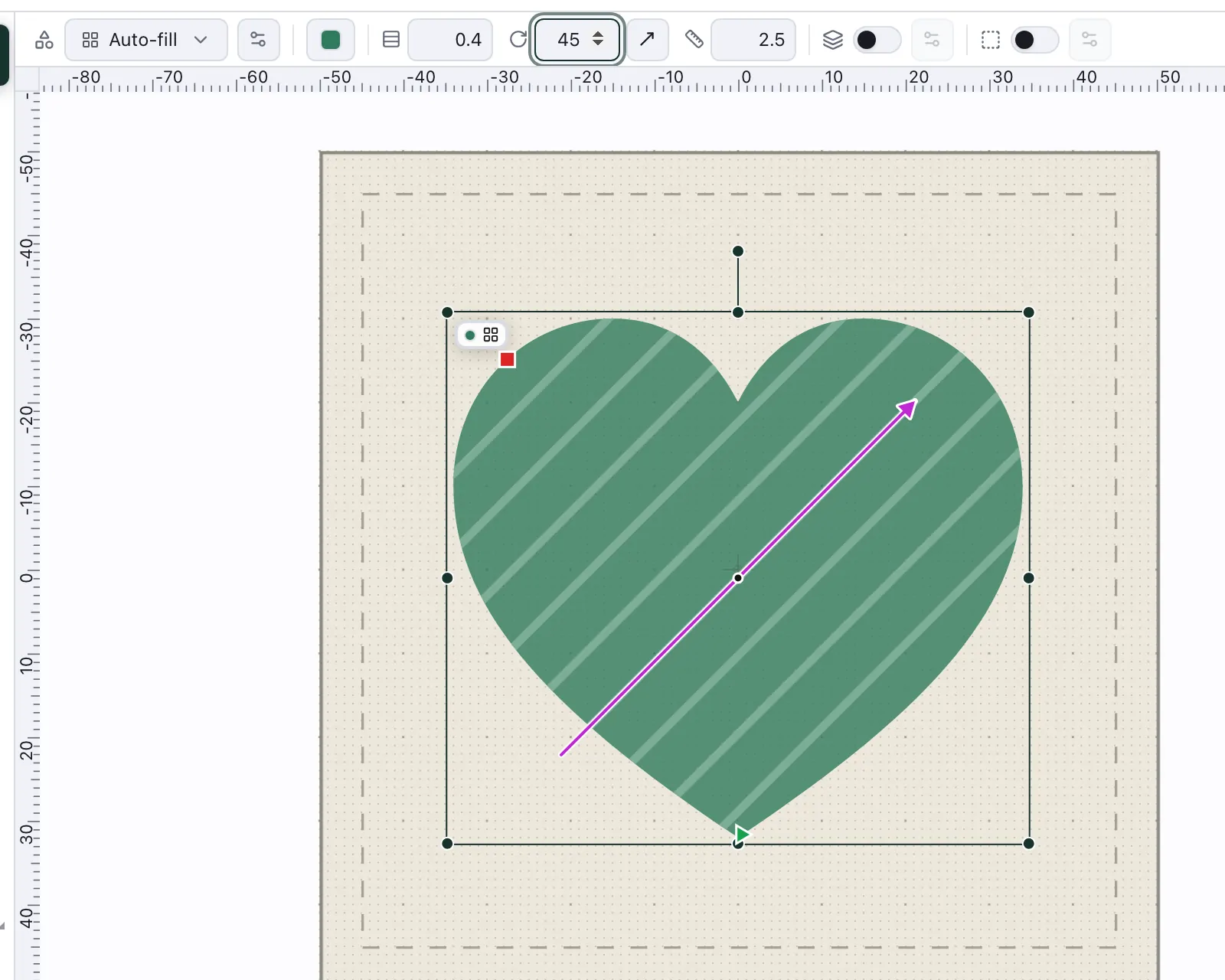
Select a filled shape and switch to the Stitch view or Simulation: the bar above the canvas sets its rows:
Row — the distance between rows. Smaller is denser: better coverage, more stitches.
Angle — the direction of the rows. Turning it changes how the light catches the thread.
Length — the longest stitch within a row.
The Design view doesn't show this bar; there the same settings are under Stitch settings in the right rail.
Row offset, behind the gear beside Type in the bar above the canvas or under Stitch settings in the right rail, sets how far each row's stitches are shifted against the row before. Even, the default, shifts each row by a quarter stitch, so the needle holes don't line up into lines across the fill. Brick shifts by half a stitch. Off keeps the rows lined up, for a texture of straight lines. Custom takes any other shift: type a share of the stitch length from 0 to 0.99. A guided fill takes the row offset too, along its guide line, where it starts at Even as guided fills were always sewn.
Fill settings shows each of these settings on the stitch engine's own stitches, with the travel, the grid and the overlap.
Pull and overlap
The thread pulls the fabric in as a fill is sewn, so the fill comes out a little narrower than drawn, and two areas that meet edge to edge show a line of fabric between them. Two settings close it up, under Stitch settings in the right rail or behind the gear beside Type in the bar, and they do different things:
Pull compensation lengthens every row at both ends, along the rows. On Automatic pull compensation, which every new shape starts with, NextStitch chooses it by how long the rows are, as it sews: 0.1 mm at each end for short rows, 0.2 mm for rows 20 mm long and 0.3 mm from 40 mm on, because a long row pulls in more than a short one. Switch Automatic off to set it yourself (0 to 1 mm); it starts from what NextStitch chose, as does typing a value. The same switch chooses the pull compensation of a satin Outline on the shape, by the outline's width. Pull compensation is sewn by Auto-fill and by a guided fill without a guide line; a colour gradient, contour and circular fills have no row ends to lengthen.
Overlap grows the whole area outward before it is sewn, all round, so it reaches under the shapes beside it: two areas that touch each reach that far past their shared edge, and no fabric shows between them. 0 sews the area as drawn. Shapes you draw start at 0; artwork you import as an SVG, clean up with Make stitch-ready or trace from a picture starts at 0.2 mm, because its areas meet edge to edge. An SVG that already carries stitch settings of its own keeps the overlap it was saved with, and its shapes without one start at 0. Auto-fill, contour, circular, guided and meander fills take an overlap; satin, cross stitch, tartan, appliqué and ripple are laid out from the shape as drawn.
Pull compensation works along the rows, the overlap in every direction: reach for the first when a fill sews too narrow, and for the second where it meets its neighbours. Either way the underlay stays on the shape as drawn, and the outline stays where you put it.
The underlay
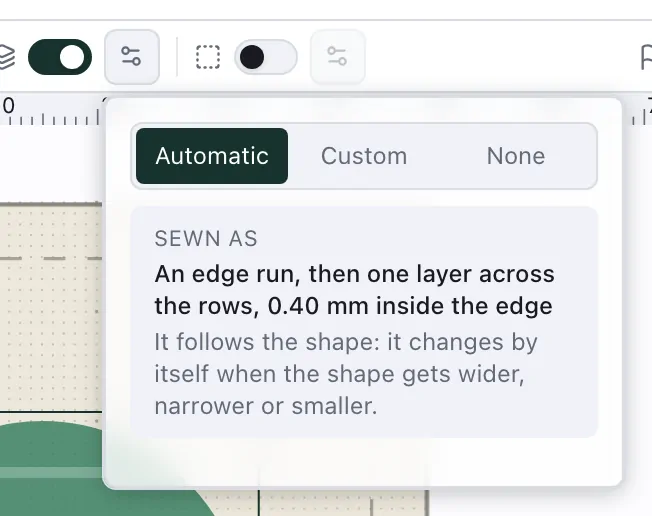
Underlay in the same bar is a switch with a gear beside it, and every new shape starts on Automatic: NextStitch chooses the underlay by the shape's size, as it sews — an edge run, then a layer across the fill rows, both kept 0.4 mm inside the edge, wherever the fill is large enough to need one — and the menu says what it chose. Custom shows the settings, starting from that choice: the Edge run, the angle of its rows (across the fill rows unless you change it), their spacing, how far the underlay stays inside the edge, its longest stitch, and whether to skip the last stitch of each row. None sews without.
The edge run is a running stitch round the shape, just inside its edge, sewn before the underlay's rows. It holds the edge down, so the fill's edge lies crisp and close to its neighbours, where the fabric would otherwise pull it in.
An Outline sewn as a fill has an underlay of its own, and Edge run in the outline's settings shows whether its band gets one. Automatic adds it to a band large enough for an underlay; switching it there sets Underlay to Custom, keeping what Automatic chose.
Underlay and pull compensation goes through every underlay setting, a satin's too, and the pull compensation in detail.
Stretchy, napped or fluffy fabric wants a stronger underlay; on a stable woven fabric and in small areas, a light one or none is enough. A design you saved before underlay was automatic keeps what it had; File ▸ Properties brings its shapes over in one step.
Open fills and textures
These settings give an area its own look, under Stitch settings in the right rail or behind the gear beside Type, most of them under Advanced:
Grid preset, on an auto-fill: an open grid in one click, its rows 2.5 mm apart at the fill's angle over a second layer across them, as far apart. The second layer is the underlay, so Underlay turns to Custom. Everything stays editable, and one undo takes the preset back.
Travel, on an auto-fill and a guided fill: how the thread moves on between rows. Automatic runs it along the edge when the rows are 1.2 mm or more apart, where travel across an open fill would show, and through the fill when they are closer. Along the edge and Through the fill decide for the one object.
Spiral direction, on a contour fill sewn as a single or double spiral: Automatic starts at the outline, or sews the other way round when that saves travel to and from its neighbours, Inward always starts at the outline, Outward sews the same stitches the other way round, so a single spiral starts in the middle. A double spiral has both its ends at the outline, and Outward starts it at its other end, one row in. Either way the stitch-out begins where you need it. The rings of Inner → outer keep their own order.
Repeats, on a contour fill and on a guided fill along its guide: each ring or row sewn once, or three or five times as a bean stitch, for bolder lines. The moves between them are sewn once.
On a meander, Inset keeps its line off the shape's edge (0–5 mm, empty for none), and Repeats sews the line once, three or five times.
New variation gives the object a fresh random look wherever something in it is random: a meander, a random stitch length, a satin's random width. Undo brings the last one back. A satin's random width is the same on both sides until you switch Same on both sides off and set each side.
Contour and spiral fills and Guided, meander and ripple fills show, setting by setting, what these fills do to the stitches.